
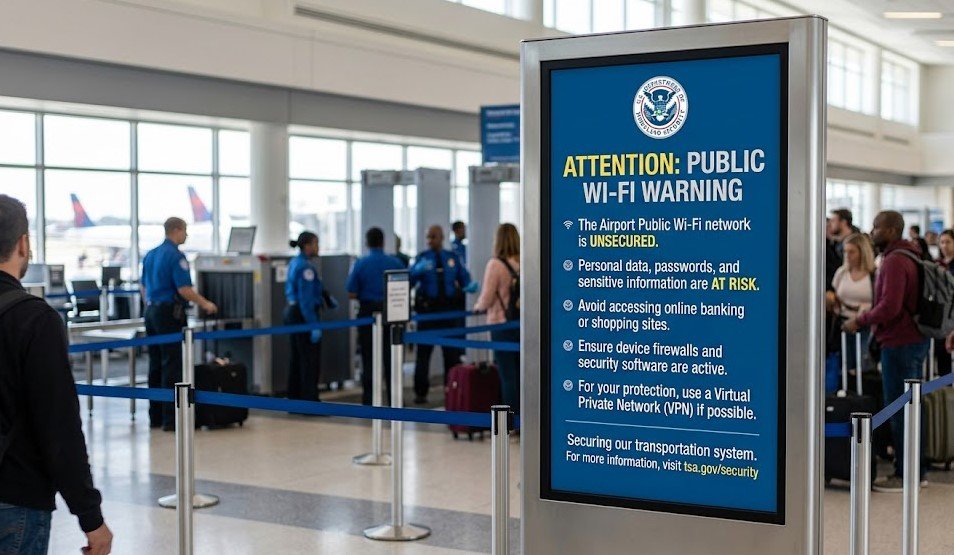
The TSA public wifi warning is a reminder for travelers to be careful when using free internet connections in airports, hotels, and other public places. It highlights that while public Wi-Fi is convenient, it is often not fully secure, which can make users vulnerable to cyber threats. TSA does not ban the use of public Wi-Fi, but it strongly encourages awareness about the risks involved, especially when handling sensitive information like passwords, emails, or banking details. The main idea behind this warning is to help travelers understand that not all networks are safe just because they are free or widely available, and extra caution is needed to protect personal data while staying connected on the go.
How Public Wi-Fi Puts Travelers at Risk
Public Wi-Fi networks may seem convenient for travelers, but they often come with serious security risks that many users overlook. The TSA public wifi warning highlights that these open networks usually lack strong encryption, which means the data you send and receive can potentially be accessed by others on the same connection. When travelers log into email accounts, social media, or online banking through such networks, they may unknowingly expose sensitive personal information. Cybercriminals often take advantage of this weak security to intercept data or monitor online activity. Because airports are busy environments with thousands of users connecting to the same network, they become attractive targets for attackers looking for easy opportunities.
Fake Hotspots and “Evil Twin” Attacks Explained
One of the most dangerous risks behind the TSA public wifi warning is the presence of fake Wi-Fi hotspots, commonly known as “evil twin” attacks. In this type of cyber threat, hackers create a Wi-Fi network with a name that closely resembles a legitimate airport or public network, tricking users into connecting without realizing it. Once a traveler connects to this fake network, the attacker can monitor online activity, capture login details, and even redirect users to harmful websites designed to steal personal information. These attacks are especially effective in crowded places like airports because people often connect quickly without verifying the network name. This makes “evil twin” Wi-Fi one of the most common and dangerous cybersecurity risks for travelers today.
TSA and Cybersecurity Experts’ Safety Recommendations
In response to growing digital threats, the TSA public wifi warning is supported by cybersecurity experts who consistently advise travelers to take extra precautions when using public networks. One of the most important recommendations is to avoid accessing sensitive accounts such as banking, email, or work systems while connected to public Wi-Fi. Experts also suggest turning off automatic Wi-Fi connections on devices to prevent accidental access to unsafe networks. Another key safety measure is using strong, unique passwords and enabling two-factor authentication wherever possible, which adds an extra layer of protection even if login details are compromised. Overall, the guidance focuses on reducing exposure and making it harder for attackers to exploit weak security points while traveling.
Safe Alternatives to Public Wi-Fi While Traveling
When considering the TSA public wifi warning, travelers are encouraged to look for safer ways to stay connected instead of relying on open public networks. One of the most secure options is using mobile data, which is generally encrypted and controlled by your cellular provider, making it far safer than public Wi-Fi. Another reliable alternative is using a personal hotspot from your smartphone, which allows you to create a private internet connection that is not shared with strangers. Many cybersecurity experts also recommend carrying a portable travel router for frequent travelers, as it adds an extra layer of control and protection. These alternatives significantly reduce the chances of data theft and help ensure that sensitive information remains secure while on the move.
Real-Life Case Study: How Travelers Get Targeted
The TSA public wifi warning becomes clearer when looking at real-world situations where travelers have been targeted through unsecured networks. In many reported cases, users connected to what they believed was official airport Wi-Fi, only to later discover their accounts had been compromised. Hackers often sit in crowded airport lounges, setting up fake networks and silently collecting data from connected devices without any obvious signs. Some victims have reported unauthorized access to their email accounts or unexpected financial transactions after using public Wi-Fi during travel. These incidents show how easily cybercriminals can exploit human trust and urgency in busy environments, making airports one of the most common places for such attacks to occur.
Final Safety Checklist for Airport Wi-Fi Use
Following the TSA public wifi warning, travelers can greatly reduce their risk by following a simple safety checklist before connecting to any airport Wi-Fi. First, always verify the exact network name with official airport staff or signage to avoid fake hotspots. Second, disable automatic Wi-Fi connections on your device so it does not join unknown networks without permission. Third, avoid logging into sensitive accounts such as banking or work emails unless absolutely necessary, and if you must, use additional security like two-factor authentication. Fourth, consider using a VPN to encrypt your internet traffic for added protection. Finally, always turn off Wi-Fi when it is not in use to prevent background connections to unsafe networks. These small steps can significantly improve your digital safety while traveling.
Conclusion
The TSA public wifi warning highlights an important truth for modern travelers: convenience should never outweigh cybersecurity. While public Wi-Fi in airports and travel hubs offers easy access to the internet, it also exposes users to risks like data theft, fake hotspots, and unauthorized access. By understanding these threats and following basic safety practices, travelers can significantly reduce their chances of becoming victims of cybercrime. Staying alert, using secure alternatives like mobile data or hotspots, and avoiding sensitive transactions on public networks are simple but powerful steps toward safer travel in a connected world.
FAQs
1. What is the TSA public wifi warning about?
It warns travelers that public Wi-Fi networks in airports may be unsafe and can expose personal data to hackers.
2. Is airport Wi-Fi safe to use?
It can be used for general browsing, but it is not fully secure for sensitive activities like banking or logging into important accounts.
3. What are fake Wi-Fi hotspots?
They are fake networks created by hackers to trick users into connecting so they can steal personal information.
4. How can I stay safe while using public Wi-Fi?
Use a VPN, avoid sensitive logins, disable auto-connect, and prefer mobile data or personal hotspots whenever possible.
For More Update Stay Tuned With: World Profit Web